FIRMWARE UPDATES
Firmware updates are occasionally available for some products. Based on their design some products
can be updated by the end user. We provide free update software, and firmware files for these products.
NO WARRANTY: Firmware updates, software, and procedures listed on this page come
with no warranty or technical support. We can update your module for only the cost of shipping if
you feel uncomfortable performing the update yourself.
WebMidi Update Tool
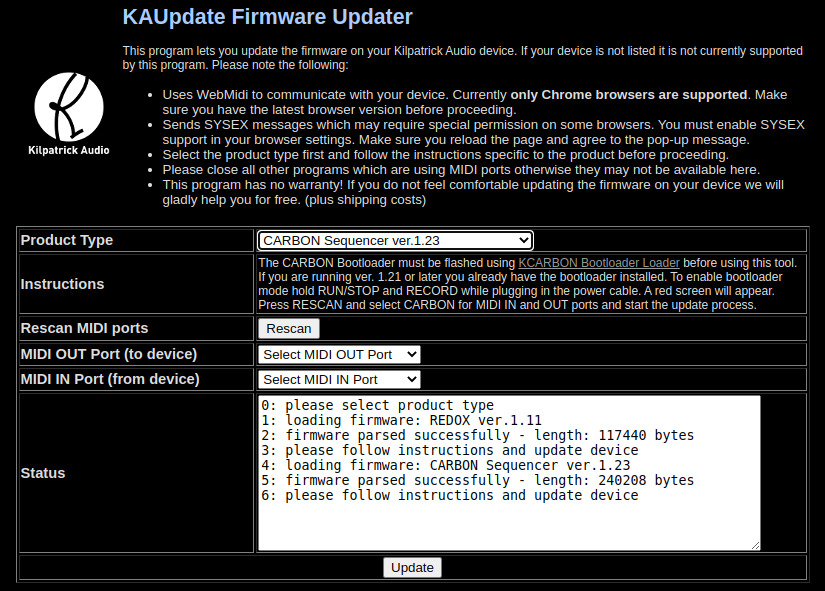
We are pleased to present our new online KAUpdate Firmware Updater featuring WebMidi technology.
No software or firmware files need to be downloaded, simply click below to launch the application in your browser.
Launch KAUpdate Firmware Updater
WebUSB Bootloader Installer for CARBON
If you are running CARBON firmware version 1.18 or lower and wish to update to the latest version it
is necessary to install the CARBON MIDI bootloader. This will allow you to update CARBON using the KAUpdate WebMIDI
tool shown above. This process only has to be performed once, and after that you can simply install new firmware
for CARBON via the WebMIDI tool.
Launch KCARBON Bootloader Loader
Firmware Version Info
| Product |
Firmware Version |
Updated Features |
| K4815 / K4816 Pattern Generator |
1.23 |
version 1.23:
- improved handling of motion type encoder for older units
all the improvements of version 1.21:
- patterns, motions and scales can be updated over MIDI using the
KPatternEdit WebMidi-based editor for K4815
- clock divider and motion length show popup with the value when changed
- MIDI CC control over pattern type, motion start and motion length
- MIDI start, continue and stop handling improvements
- reset switch / input sends song position pointer message
- numerous bugfixes and improvements
|
| K1600 MIDI Converter |
1.40 |
version 1.40:
- added mono CV pitch/velocity mode
- it appears just after the ARP mode
- pitch output on CV1
- velocity output on CV2
- gate output on GATE1
all the improvements of version 1.31:
- additional bug fixes and improvements
all the improvements of version 1.30:
|
| K2579 Step Sequencer |
1.02 |
- improvement for pulse input triggering
|
| PHENOL |
1.27 |
- version 1.27 changes:
- better mixer sound quality
- version 1.26 changes:
- ability to ignore MIDI clock stop commands so CLOCK OUT
generates pulses continuously
- version 1.25 changes:
- mixer pan pot leakage fixed
- version 1.24 changes:
- sequencer can now be started while external MIDI clock is used
- delay LED works correctly with low settings
- bug fixes and improvements
- usage notes included with firmware archive
|
| CARBON |
1.21 |
- version 1.26 changes:
- fixed a regression that could cause custom patterns to not load
- version 1.25 changes:
- USB timing improved to provide more robust USB host and device connections
- version 1.24 changes:
- MIDI improvements
- MIDI remote control ranges fixed on several parameters
- version 1.23 changes:
- adjust the LCD screen slew rate to prevent corruption on older displays
- version 1.21 changes:
- same functionality as 1.18 but designed for MIDI bootloader install
- version 1.18 changes:
- the USB device now shows up as CARBON on a PC
- step recording cutting off the first note is fixed
- overdub real-time recording works on subsequent passes
- USB host driver has been improved for silicon bug workaround - hopefully now with better reliability and lower resource usage
- version 1.14 changes:
- added scene change sync option - it can now be set to beat, or the end of loop on track 1
- more options for MAGIC - there are now Range and Chance options to adjust the output
- changed step edit in drum mode so it doesn't replace all notes - this works better for editing drum parts
- changed record to disable multiple track selection
- added record immediate and overdub - real-time recording now stays active until stopped
- added more arps
- added the ability to edit the gate patterns directly on CARBON
- added the ability to adjust the step-record note length
- added fine gate time control with shift
- added song list end point actions so you can loop the last scene, reset the entire song, or just stop the sequencer
- Additional bug fixes and improvements.
- version 1.12 changes:
- Added more scales - thanks to CARBON user Bill Butler
- Improved MIDI clock to be even more precise.
- Added a CV Output Offset function as per user request.
- Added autolive function to enable live playing over sequences.
- Additional bug fixes and improvements.
- version 1.11 changes:
- Fixed a problem where some track mutes were overwritten during song load.
- version 1.10 changes:
- Fixed a problem where some GUI information might not be update after a scene change.
- Fixed regression that made resetting song mode impossible.
- Fixed gate output on CV velocity mode.
- Internal improvements not related to user experience.
- version 1.08 changes:
- show externally locked MIDI clock tempo
- local tempo changes are locked out when externally synced
- tap tempo is locked out when externally synced
- GUI clock source display refreshes on song load/clear
- added clock source in menu instead of multiple ins
- clock out run on straight time signal
- GUI displays "EXT" in green colour when locked to ext sync, grey otherwise
- playback can be controlled locally to start while ext synced
- version 1.07 changes:
- MIDI remote control ignores messages correctly when MIDI Rmt Ctrl is off
- external clock sync is completely redesigned and should stay locked to external clock better
- external clock loss causes correct stop behaviour
- removed some debug code from the clock module
- small fixes to make code cleaner - should not have any effect
- version 1.06 changes:
- Fixed possible buffer overrun during real-time recording
- version 1.05 changes:
- LCD type can be set via SYSEX during production
- Fixed real-time recording of CC data
- MIDI inputs now respond on all channels
- Change to how song.c handles invalid song loading
- version 1.04 changes:
- Fixed a regression found in 1.03 where MIDI program change couldn't be disabled.
- version 1.03 changes:
- support for new LCD module used on new production units (shipping November 2016)
- song version writes back properly into song file - this is needed to support automatic song updating on newer firmwares
- program change can be disabled after set
- support for MIDI song select as part of the MIDI remote control mode
- metronome volume (duration) can be controlled
- menu timeout can be adjusted or disabled
- external MIDI clock input can be disabled on a per-port basis
- step length and arpeggiator can now be set to triplet divisions
- step edit can set a note to any valid MIDI note number and notes that become invalid due to transposing are discarded while being sent
- step size in the track info display now displays properly after a scene change
|
| REDOX |
1.12 |
- version 1.12 changes:
- Multi-tap delay effects have smooth time changes without noise
- LCD backlight and contrast control are activated with two buttons only
|